

Download Computer Data Recovery Software – Secure, Fast & Free File Recovery Tool for Windows, Mac, Android & iOS
Losing important files due to accidental deletion, formatting, virus attacks, or system crashes can be devastating. But with Computer Data Recovery Software, you're never too late to recover what’s been lost. This powerful, user-friendly tool scans your hard drive, external storage, USB drives, and memory cards to retrieve deleted or corrupted files with remarkable accuracy.
Whether you're a student, professional, or casual user, this software offers a reliable solution to restore lost documents, photos, videos, audio files, and more. With advanced scanning modes like Quick Scan, Extensive Scan, and File Trace, it adapts to various data loss scenarios. The intuitive interface ensures even beginners can navigate the recovery process effortlessly.
Best of all, it supports multiple operating systems, including Windows, Mac, Android, and iOS, making it a versatile choice for all your digital needs. Download this free, secure, and efficient recovery tool today and regain peace of mind.
Advanced Features That Make Recovery Effortless
One of the standout strengths of Computer Data Recovery Software lies in its intelligent and multi-layered scanning system. Unlike basic recovery tools that offer only a single scan method, this software provides three distinct scanning options to maximize your chances of file recovery. The Quick Scan is ideal for recently deleted files—fast and efficient, it checks the file system’s metadata to locate removable entries. For deeper recovery, the Extensive Scan dives into the raw disk sectors, analyzing every byte to uncover files that may have been erased beyond standard deletion. Finally, the File Trace feature is designed for complex scenarios like corrupted partitions or disk errors, using advanced algorithms to track fragmented or scattered data across storage media.
Beyond scanning, the software includes several smart tools that enhance the recovery workflow. The Save Recovery Snapshot function lets you preserve the current state of a scan, allowing you to return later without starting from scratch. This is especially useful when dealing with large drives or when you need to pause and review results.
The Load Recovery Snapshot feature enables you to resume previous sessions, saving valuable time. The File Filter tool helps narrow down results by file type, size, or name, making it easier to locate specific documents or media files. Additionally, the Find Files function uses keyword search to pinpoint documents based on content, even if the file name is missing.
All recovered files are highlighted in red for immediate visual identification, ensuring no critical data slips through the cracks.
What truly sets this software apart is its ability to recover files regardless of size or name length. Whether you're trying to restore a 10GB video file or a 100KB spreadsheet with a long, complex filename, the tool handles them with precision. It supports a wide range of file formats, including Word, Excel, PDF, JPEG, MP4, MP3, and more. The software is also designed to work with various storage devices—external hard drives, SSDs, SD cards, USB sticks, and even RAID arrays. With these features, it’s not just a recovery tool; it’s a comprehensive data rescue solution for modern digital life.
Seamless Installation & Easy-to-Use Recovery Process
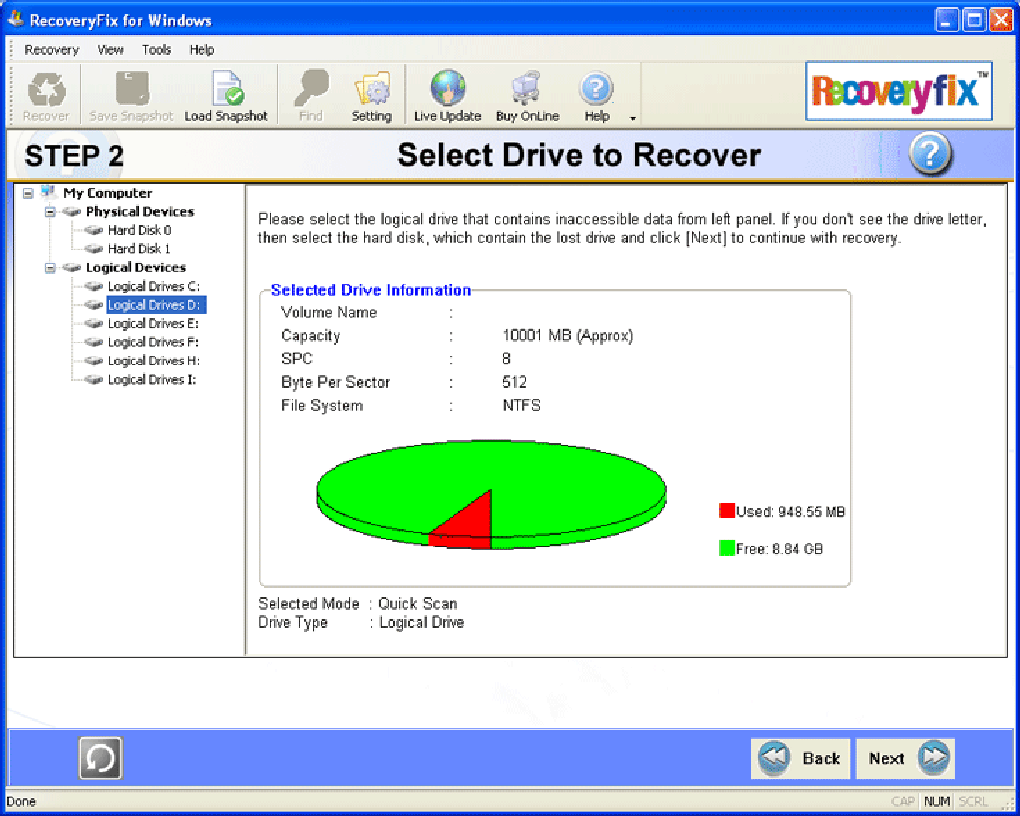
Getting started with Computer Data Recovery Software is straightforward and hassle-free. After downloading the installer from the official website, simply run the file and follow the on-screen prompts. The installation process is quick, typically taking less than a minute, and requires minimal system resources. Once installed, the software launches with a clean, modern interface that guides you through every step. The main dashboard displays all connected drives and storage devices, allowing you to select the target location for recovery—be it your internal hard drive, an external SSD, or a memory card.
After selecting the drive, you can choose from the three scanning modes based on your situation. For a file deleted yesterday, Quick Scan is recommended. If the file was lost weeks ago or the drive was formatted, opt for Extensive Scan. For severe corruption or partition loss, File Trace is the best choice. The software runs in the background while you continue using your computer, though it’s advised to avoid writing new data to the target drive during the scan to prevent overwriting lost files.
Once the scan completes, a detailed list of recoverable files appears. You can preview files before recovery—especially useful for images and documents—ensuring you’re only restoring what you need. Select the files, choose a safe destination (preferably a different drive), and click Recover.
The process is secure and does not alter the original data. You can also save the recovery session as a snapshot for future reference. With its intuitive design and step-by-step guidance, even non-technical users can recover lost data with confidence and minimal stress.
Compatible with Windows, Mac, Android & iOS – Universal Data Recovery
One of the most valuable aspects of Computer Data Recovery Software is its broad compatibility across multiple platforms. Whether you're using a Windows PC, a Mac, an Android smartphone, or an iOS device, this tool is equipped to handle data recovery across all major operating systems. On Windows, it supports Windows 10, 11, 8, and 7 (32-bit and 64-bit), seamlessly integrating with the file system to detect deleted or lost data. For Mac users, the software works with macOS Big Sur, Monterey, Ventura, and Sonoma, offering native support for APFS and HFS+ file systems.
For mobile users, the software provides a companion app that connects via USB or Wi-Fi to recover photos, videos, messages, and contacts from Android and iOS devices. The mobile version supports popular brands like Samsung, iPhone, Huawei, and Google Pixel. Whether you’ve accidentally deleted a family photo from your phone or lost a critical work document from your tablet, this tool can help retrieve it. The mobile interface is touch-optimized and user-friendly, ensuring a smooth experience on smaller screens.
Additionally, the software supports a wide range of storage media, including external hard drives, USB flash drives, SD cards, memory sticks, and even RAID configurations. This makes it a go-to solution for photographers, videographers, IT professionals, and anyone who relies on multiple devices. Its ability to work across platforms ensures that no matter where your data lives, you have a reliable recovery option. With such versatility, it’s not just a software—it’s a digital safety net for modern users.
Pros & Cons: Is This Software Right for You?
- Pros:
- Three powerful scanning modes: Quick Scan, Extensive Scan, and File Trace
- Supports recovery of over 200 file types across all major formats
- Intuitive interface with preview and filter tools for easy navigation
- Compatible with Windows, Mac, Android, and iOS devices
- Free version available with robust recovery capabilities
- Save and load recovery snapshots for efficient workflow
- Fast performance and low system resource usage
- Cons:
- Advanced features require a paid upgrade (trial version limits recovery size)
- Mobile recovery requires physical connection or Wi-Fi setup
- Not ideal for extremely severe physical drive damage
- Recovery success depends on no new data written to the drive
Frequently Asked Questions (FAQ)
-
Can I recover files after formatting my hard drive?
Yes, Computer Data Recovery Software can recover files after formatting. The software uses the Extensive Scan and File Trace modes to recover data from formatted drives, as long as new data hasn’t been written over the original sectors.
-
Is the software safe to use? Will it damage my files?
Absolutely. The software operates in read-only mode, meaning it never modifies or overwrites original data. It only reads disk sectors to locate and recover lost files, ensuring complete safety.
-
How long does the recovery process take?
The time varies based on drive size and scan type. Quick Scan takes minutes, Extensive Scan can take 30–60 minutes for large drives, and File Trace may take longer for severely damaged drives.
-
Can I recover files from a damaged or unbootable system?
Yes. You can connect the drive to another computer and run the software from a different system. The software doesn’t require the original operating system to be functional.
-
Is there a free version available?
Yes, a free version is available with full scanning capabilities and limited recovery (e.g., file size cap). For full recovery, a paid license is required, but the free version is excellent for testing and small-scale recovery.
Conclusion: Don’t Wait—Recover Your Data Today
When it comes to data loss, time is of the essence. Computer Data Recovery Software is a powerful, secure, and reliable tool that gives you a second chance to retrieve lost files—whether due to deletion, formatting, viruses, or system crashes. With its intelligent scanning technology, cross-platform compatibility, and user-friendly interface, it stands out as one of the best data recovery solutions on the market. The ability to save recovery snapshots, filter results, and preview files before recovery adds a layer of control and confidence.
While the free version offers impressive capabilities, upgrading unlocks full recovery potential. Whether you're recovering personal photos, work documents, or project files, this software is a must-have digital safety net. Download Computer Data Recovery Software today and protect your digital life with peace of mind.
? Download Now – Secure, Fast, and Free File Recovery for Windows, Mac, Android & iOS







